
Algebra Calculator
Solve linear equations, quadratic equations and systems of equations with step-by-step working
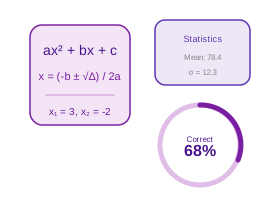
Linear: ax + b = c — solve for x
functions Key Formulas
Linear: x = (c - b) / a
Quadratic: x = (-b — v(b²-4ac)) / 2a
Discriminant: Δ = b²-4ac; Δ>0 two roots, Δ=0 one root, Δ<0 complex
Cramer's Rule: x = Dx/D, y = Dy/D where D = a1b2 - a2b1
Enter values and click Solve to see the result here.
Real-Life Guide to Using the Algebra Calculator
Solve linear and quadratic equations. Use the examples and checks below to turn the number into a practical decision.
When this calculator is useful
Use this to solve for an unknown variable in a linear equation like 4x − 9 = 19, or a quadratic equation, when you want to check your own algebra homework or skip repetitive manual isolation steps.
For most people, the best way to use the Algebra Calculator is to try the real case first, then change one input at a time. That makes the trade-off visible. For example, with a loan calculator you can change tenure while keeping the same rate; with an investment calculator you can change return assumption while keeping the same monthly contribution; with a health, education or measurement calculator you can check how much one input changes the final category.
The result should answer a practical question: Can I afford this? How much should I save? Is this score enough? Is this measurement within range? What is the safer or cheaper option? If the output does not answer the decision clearly, adjust the inputs until the scenario matches your real situation.
Practical Advice
Use the Algebra Calculator as a planning tool, not just a number generator. Write down the inputs you used, because the final answer is meaningful only when you remember the assumptions behind it.
If the decision affects money, health, tax, safety, academics or legal compliance, keep a second check ready. That second check may be a bank quote, payslip, official rule, prescription, site measurement, mark sheet or invoice.
Common Mistakes
- Applying an operation to only one side of the equation, such as adding 5 to the left side of 2x + 5 = 15 without adding it to the right side too.
- Forgetting to flip the sign when moving a term across the equals sign — 3x − 7 = 8 becomes 3x = 8 + 7 = 15, not 3x = 8 − 7 = 1.
- Dividing both sides by a variable that could equal zero, which silently discards a valid solution — dividing x² = 3x by x loses the root x = 0.
- Distributing incorrectly across parentheses, treating 2(x + 3) as 2x + 3 instead of 2x + 6.
- Combining unlike terms, such as adding 3x and 5 together to get 8x, when they cannot be combined until x is known.
How to Interpret Results
The value(s) shown are the x that make the original equation true — substitute the answer back into the equation exactly as it was written to confirm both sides come out equal before trusting the result.
A good interpretation looks at both the main result and the supporting values. If a page shows totals, ratios, categories, schedules or warnings, read those together instead of focusing only on the biggest number.
Algebra Calculator FAQs
Useful answers for interpreting the output, avoiding mistakes and using the result responsibly.
What is an Algebra Calculator?
An algebra calculator solves linear and quadratic equations, simplifies expressions, and evaluates polynomial roots. It helps students check their work, understand step-by-step solution methods, and verify answers to algebraic problems quickly.
For linear equations (ax + b = c), the solution is straightforward. For quadratic equations (ax2 + bx + c = 0), the quadratic formula is applied to find real or complex roots, the discriminant tells us the nature of solutions, and the vertex of the parabola is computed.
help_outlineHow to Use the Algebra Calculator
- Select the equation type using the tabs — Linear (ax + b = c), Quadratic (ax2 + bx + c = 0), or System (two equations, two unknowns).
- For Linear: enter the coefficient a, constant b, and right-hand side c; click "Solve Linear Equation" to find x.
- For Quadratic: enter a, b, and c; click "Solve Quadratic" to get both roots via the quadratic formula along with the discriminant value.
- For System of 2 Equations: enter all 6 coefficients (a1, b1, c1 and a2, b2, c2); click "Solve System" — Cramer's Rule is used to find x and y.
- Review the step-by-step working shown below the result to understand the method — useful for verifying homework and exam answers.
Benefits
- Step-by-step working shown for every equation type — learn the method, not just the answer
- Discriminant displayed for quadratics — know nature of roots before solving
- Three equation types in one tool — covers Class 10 to undergraduate algebra
- Handles decimal and negative coefficients accurately
- Cramer's Rule method for simultaneous equations — directly applicable to JEE and board exams
Key Terms
- Linear Equation
- ax + b = c; solution is x = (c - b) / a; exactly one solution (if a ≠ 0)
- Quadratic Equation
- ax2 + bx + c = 0; solved by x = (-b — vΔ) / 2a; up to two roots
- Discriminant (Δ)
- b2 - 4ac; Δ > 0 = two real roots, Δ = 0 = one repeated root, Δ < 0 = complex roots
- System of Equations
- Two equations with two unknowns (x, y); solved using Cramer's Rule via determinants
- Cramer's Rule
- x = Dx/D, y = Dy/D where D = a1b2 - a2b1; fails when D = 0 (no unique solution)